Nebula Capsule 3 Projector 1080P Review: Real User Experience After 3 Months
I remember the specific moment I decided a portable projector was no longer a luxury but a necessity for my lifestyle. I was sitting in my cramped apartment in late February, staring at a 40-inch TV that felt increasingly inadequate for movie nights, yet I didn't have the wall space or the desire to mount a massive 75-inch panel. I wanted something that could follow me from the living room to the bedroom, and eventually, to the patio once the weather cleared up. After weeks of scouring forums and watching technical teardowns, I pulled the trigger on the Nebula Capsule 3 1080P. Now, having lived with this soda-can-sized cinema for exactly ninety-two days, I’ve moved past the honeymoon phase and into the reality of what it’s actually like to own and operate this device daily.
In my experience, "portable" often comes with a laundry list of compromises. Usually, you sacrifice brightness, resolution, or battery life—sometimes all three. When I first unboxed the Capsule 3, I was skeptical. It looked almost identical to its predecessor, but the shift from 720p to a native 1080p resolution was the primary reason I chose this model over the older versions. I’ve spent the last few months projecting onto painted walls, dedicated screens, and even the ceiling while lying in bed. What I found was a device that is remarkably capable but also possesses a few quirks that you only really notice after the initial excitement wears off.
The First Impression and Setup Rituals
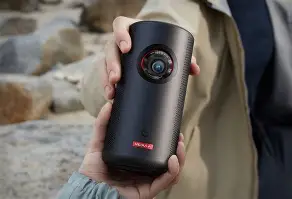
When I first took the Capsule 3 out of the box, I was struck by the build quality. It has a reassuring heft to it—about 2.1 pounds—that makes it feel like a premium piece of tech rather than a toy. The matte black finish is sleek, though I noticed that it attracts fingerprint oils more than I’d like. Setting it up for the first time was surprisingly fluid. I’ve dealt with projectors in the past that required ten minutes of manual dial-turning just to get a clear image. With this unit, the "Intelligent Environment Adaptation" technology did most of the heavy lifting. I placed it on my coffee table, hit the power button, and within about three seconds, it had performed an autofocus and an auto-keystone correction that was almost perfect.
However, "almost perfect" is an important distinction. In my experience, while the auto-keystone is great for a quick setup, I found myself diving into the settings about 40% of the time to fine-tune the corners. If the projector is at a particularly sharp angle, the software tends to overcompensate, leaving a slight "light bleed" gray trapezoid around the actual projected image. It’s a common issue with digital keystone correction, but one I had to learn to live with when I couldn't get a direct head-on placement.
Picture Quality: The 1080p Reality Check
The jump to 1080p is, quite frankly, the best thing Nebula could have done for this line. I’ve tested 720p portable projectors before, and the "screen door effect"—where you can see the individual pixels—is usually distracting. With the Capsule 3, the image is crisp. When I watched Dune: Part Two on a roughly 100-inch projection, I was surprised by the level of detail in the sand textures and the facial expressions of the actors. It doesn’t replace a high-end 4K laser projector, obviously, but for something that fits in a cupholder, it’s impressive.
Brightness, however, is where the reality of portable projection sets in. It’s rated at 200 ANSI Lumens. In my living room during a bright Sunday afternoon with the curtains open, the image was almost invisible. I quickly learned that this is strictly a "lights out" or "dim environment" device. What I found was that the sweet spot for this projector is around 80 to 90 inches. Once I tried to push it to the advertised 120 inches, the brightness dropped off significantly, and the colors started to look a bit washed out. In a pitch-black room, the colors are punchy and the contrast is decent for a DLP chip, though the blacks are more of a very dark gray.
The Software Experience: Google TV and the Netflix Hurdle
Now, let’s talk about the brain of the machine. The Capsule 3 runs on Google TV, which is a massive upgrade over the older Android mobile-based interfaces found on many competitors. The interface is snappy, and having the Google Assistant button on the remote has actually been more useful than I anticipated for searching for titles across different apps. I’ve been using it to stream from YouTube, Disney+, and Hulu without any major hitches.
One thing that bothered me, and continues to be a minor annoyance, is the Netflix situation. As many Nebula owners know, Netflix famously doesn’t natively certify many portable projectors. While you can install a version of Netflix through the Nebula Play app, it’s not the official TV-optimized version. This means you often have to use a "mouse mode" on the remote or a phone app to navigate the menus. After two weeks of fiddling with it, I ended up just plugging a dedicated streaming stick into the HDMI port. It felt redundant since the projector has "smart" guts, but for a seamless Netflix experience, it was a necessary workaround for me.
Audio Performance: Small Body, Big Voice?
I was genuinely surprised by the 8W speaker. Usually, built-in projector speakers are tinny and barely audible over the cooling fan. The Capsule 3, however, produces a sound that is focused and clear. It uses the entire body of the projector as a resonance chamber. I’ve used it for casual viewing—think sitcoms or documentaries—without ever feeling the need to hook up an external speaker. The fan noise is also remarkably low; when a movie is playing at a moderate volume, the whisper of the fan completely fades into the background.
Find top-rated Electronics products at great prices.
Browse Now →That said, if you’re looking for a "theatrical" experience, the 8W speaker lacks the low-end punch needed for action-heavy movies. When I watched Top Gun: Maverick, the roar of the jet engines felt a bit thin. Fortunately, the Bluetooth connectivity is solid. I’ve successfully paired it with my Sonos Roam and a pair of Sony headphones for late-night viewing, and I didn't notice any significant lip-sync latency issues, which is a huge win over some cheaper Bluetooth-enabled projectors I’ve tried in the past.
Battery Life: The Two-Hour Limit
One of the main reasons I bought the Capsule 3 was the promise of a built-in battery. Nebula claims up to 2.5 hours of playtime in "Battery Mode." In my experience, that number is a bit optimistic if you have the brightness set to anything usable. I usually get about 2 hours and 10 minutes before the 20% warning pops up. This is just enough for most movies, but if you’re watching something like Oppenheimer or a long sporting event, you absolutely need to be near an outlet.
I also discovered that the projector supports Power Delivery (PD) charging via its USB-C port. This was a lifesaver during a camping trip in April. I was able to run the projector off a high-capacity power bank that supports 45W output. It makes the device feel truly portable because you aren't tethered to a wall if you have a decent battery pack in your bag.
Detailed Pros and Cons
After three months of daily and weekly use, here is my honest breakdown of where the Nebula Capsule 3 shines and where it stumb…- Pro: Exceptional Portability - I’ve tossed this in my backpack for three diferentes trips now, and it takes up less space than a pair of shoes. The included lens cover (integrated) is a nice touch for protection.
- Pro: 1080p Clarity - The sharpness is a noticeable upgrade over the Capsule 2. Text is readable, and high-definition content looks genuinely "HD."
- Pro: Fast Autofocus - I love how quickly it adjusts. You can move it from a table to a tripod, and it fixes itself in seconds without you touching a menu.
- Pro: USB-C PD Charging - The ability to charge via a standard 45W laptop charger or power bank simplifies my cable management significantly.
- Con: 200 ANSI Lumens is Low - You really do need a very dark room. Even a hallway light being on in the next room can wash out the blacks.
- Con: Netflix Certification - The workaround is clunky. For a premium-priced device, I really wish the software supported the native Netflix app out of the box.
- Con: Battery Life Variability - If you use the "Standard" brightness mode on battery, you’ll be lucky to hit the two-hour mark. It forces you into "Eco" mode, which dims the image further.
- Con: Remote Feedback - The remote is fine, but it’s IR-based mostly, so you have to point it generally toward the unit or the screen. Sometimes I found it unresponsive if the projector was placed behind me.
Feature Comparison: Capsule 3 vs. The Competition
Before I bought the Capsule 3, I spent a lot of time comparing it to the older Capsule 2 and the more expensive Mars series. Here is a breakdown of how the specs compare to other models I considered in this price bracket.
| Feature | Nebula Capsule 3 1080p | Nebula Capsule 2 | Typical Budget 1080p Portable |
|---|---|---|---|
| Native Resolution | 1920 x 1080 (Full HD) | 1280 x 720 (HD) | 1920 x 1080 (Full HD) |
| Brightness | 200 ANSI Lumens | 200 ANSI Lumens | 100-150 ANSI Lumens |
| Operating System | Google TV | Android TV 9.0 | Basic Android or No OS |
| Battery Life | ~2.5 Hours | ~2.5 Hours | ~1.5 - 2 Hours |
| Auto-Keystone | Vertical & Horizontal (Auto) | Vertical Only (Auto) | Manual Only |
| Sound | 8W Speaker | 8W Speaker | 3W - 5W Speaker |
A Brief Buying Guide for Potential Owners
If you are reading this, you’re likely trying to decide if the Capsule 3 is worth the premium over the dozens of $150 projectors flooding the market. Based on my three months with it, here is who I think should—and shouldn't—buy this device.
Who This Is For:
In my opinion, this projector is perfect for the "nomadic viewer." If you’re a student in a dorm, someone who travels for work and hates hotel TVs, or a parent who wants to host "Outdoor Movie Night" for the kids in the backyard, this is a fantastic tool. The build quality and the reliability of the autofocus make it a "it just works" device. I’ve also found it incredible for "ceiling cinema." Because it’s so small, I can prop it up on its back using a small tripod and project straight onto the ceiling above my bed. It’s a level of comfort I didn't know I needed.
Who This Is Not For:
I would not recommend this as a primary home theater replacement. If you have a dedicated wall and you plan on keeping your projector in one spot permanently, you can get much brighter, more powerful "stationary" projectors for the same price. You’re paying a premium for the miniaturization and the battery. Furthermore, if you plan on using your projector in a room with any amount of daylight, you will be disappointed. This is a creature of the night and demands a dark environment to truly shine.
Shop the latest Electronics picks on Amazon.
Shop Amazon →Essential Tips from My Experience:
First, get a small, sturdy tripod. While the projector can sit on a flat surface, the ability to tilt it up even 10 degrees makes a world of difference for keystone accuracy. Second, if you’re a heavy Netflix user, just factor in the cost of a small streaming stick (like a Chromecast or Fire Stick) from day one. It plugs into the back, can be powered by the projector’s own USB-A port with a short cable, and solves all of the navigation headaches. Lastly, keep the firmware updated. In the three months I’ve owned it, I’ve received two updates that noticeably improved the speed of the Google TV interface and the accuracy of the autofocus.
Detailed Analysis: Durability and Longevity
One aspect I was worried about was the thermal management. In such a small chassis, heat is usually the enemy of electronics. I noticed that after a three-hour binge-watching session, the top of the Capsule 3 gets quite warm to the touch, but never "hot." The internal fans do their job well, and I haven't experienced any thermal throttling or unexpected shutdowns. This gives me confidence that the internal hardware isn't cooking itself over time.
I’ve also been mindful of the battery health. I try not to leave it plugged in 24/7 once it hits 100%, and I usually let it drain to about 20% before recharging. So far, I haven't noticed any significant degradation in the total runtime. The lens itself is recessed slightly, which prevents it from getting scratched when I slide it into my bag, but I do find myself having to wipe the dust off it more often than a standard projector because the static on the plastic body seems to attract it.
Final Thoughts After Three Months
After ninety days of use, the Nebula Capsule 3 has firmly integrated itself into my routine. It hasn't been without its frustrations—the Netflix workaround still feels like a slight oversight for a 2024-era device, and I occasionally wish I had an extra 100 lumens of brightness for those early evening starts. However, the sheer convenience factor is hard to beat. I can be watching a YouTube video in the kitchen while cooking and, within thirty seconds, have that same video projected at 90 inches in my bedroom.
In my experience, many tech gadgets lose their luster after the first month. We buy them for a specific use case, and then they end up in a drawer. The Capsule 3 hasn't suffered that fate. Because it’s so easy to set up, I find myself using it four or five times a week. Whether it’s playing a lofi-hip-hop "mood" video against the wall during dinner or catching up on the latest HBO series while lying on my back, it has changed how I consume media in my home. It’s a specialized tool that does exactly what it promises: it provides a high-quality, ultra-portable cinema experience that fits in the palm of your hand. As long as you respect its limitations regarding ambient light and battery life, it’s a remarkably rewarding device to own.
Ultimately, the Nebula Capsule 3 isn't about having the biggest or the brightest screen in the world; it’s about having a "good enough" screen *anywhere* in the world. For $1000, I would be much harsher on its brightness levels, but at its current market position, the balance of features feels right. I don't regret the purchase, and I suspect most people looking for this specific blend of portability and 1080p clarity will feel the same way.