The Ultimate Setup Guide for Your Once Upon Photo Book
In the digital age, the tactile experience of flipping through a physical photo album remains one of the most cherished ways to preserve memories. While smartphones allow for the capture of thousands of images, they often remain buried in digital cloud storage, rarely revisited. This disconnect between capturing a moment and actually experiencing it has paved the way for modern book-making platforms. Among the most popular in the photography and lifestyle space is Once Upon, an app-based service designed to simplify the journey from a camera roll to a coffee table. This guide explores the ecosystem of the Once Upon photo book, providing a technical and creative analysis of how to maximize the platform for professional-grade results.
Understanding the Once Upon Philosophy
Most traditional photo book services were born in the desktop era, requiring users to navigate complex web interfaces, drag-and-drop grids, and high-intensity design software. The Once Upon framework shifts this paradigm by focusing exclusively on the mobile experience. It is built for the "on-the-go" documentarian. The core philosophy centers on the idea that the best time to design a book is while the memories are still fresh, utilizing the device that captured the photos in the first place. For camera enthusiasts and family historians, this means the barrier to entry is significantly lowered, though it requires a specific strategic approach to ensure the final printed product meets high aesthetic standards.
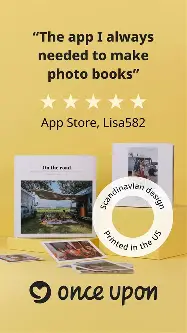
The service distinguishes itself through a minimalist Scandinavian design aesthetic. Eschewing the cluttered backgrounds, clip art, and neon borders often found in discount photo services, Once Upon focuses on clean layouts, ample white space, and high-quality typography. This makes it a preferred choice for those looking to create a cohesive library of books that look uniform on a shelf. Whether documenting a child’s first year, a cross-country road trip, or a portfolio of landscape photography, the setup process is the foundation of a successful project.
Detailed Product Analysis: Quality and Specifications
Before diving into the setup, it is essential to understand the physical product. Once Upon offers three primary formats: "Softcover," "Hardcover," and "Cloth." Each serves a different purpose in a photographer's collection. The paper quality is a consistent highlight, typically utilizing a 170 gsm (grams per square meter) silk-finish paper that balances the vibrance of gloss with the sophistication of matte. This weight is substantial enough to prevent "ghosting"—where the image on the reverse side of the page bleeds through—while maintaining the flexibility required for easy browsing.
The printing process utilizes high-end digital presses. For the photographer, this means color reproduction is generally faithful to the digital original, provided the user has accounted for the "screen vs. print" brightness differential. Digital screens are backlit and can make photos appear brighter than they will look on non-backlit paper. Therefore, a key part of the setup involves slight exposure adjustments to ensure shadows do not lose detail in the physical print.
Pros and Cons of the Once Upon System
- Pros: Exceptional ease of use through a streamlined mobile interface that avoids decision fatigue.
- Pros: High-quality, minimalist templates that ensure a professional look even for those without graphic design skills.
- Pros: Collaborative features allow multiple users to contribute photos to the same book, which is ideal for weddings or group vacations.
- Pros: Sequential layout logic helps tell a chronological story without manual sorting.
- Pros: Durable binding and high-grade paper stock that resists fingerprints and aging.
- Cons: Limited customization for users who want total control over pixel-perfect placement or custom fonts.
- Cons: Mobile-only focus can be a limitation for those who prefer editing and selecting photos on a large 4K color-calibrated monitor.
- Cons: Higher price point than budget-tier mass-market printers, reflecting the premium design focus.
The Comparison: Selecting Your Format
Choosing the right format is the first technical decision in your setup journey. The following table breaks down the typical applications and specifications for the Once Upon lineup.
| Feature | Softcover (Midi) | Hardcover (Classic) | Cloth (Deluxe) |
|---|---|---|---|
| Durability | Moderate; best for light handling | High; rigid protection | Excellent; heirloom quality |
| Aesthetic | Magazine-style/Casual | Classic bookshop feel | Sophisticated/Textured |
| Best Use Case | Monthly recaps, kids' art | Annual yearbooks, travel | Weddings, milestone birthdays |
| Page Capacity | Up to 100 pages | Up to 200 pages | Up to 200 pages |
| Storage | Space-saving | Standard shelf presence | Display piece/Coffee table |
Step-by-Step Setup and Creative Workflow
The "Ultimate Setup" isn't just about clicking buttons in an app; it is about a systematic approach to digital asset management and narrative construction. To produce a book that feels intentional rather than cluttered, follow this advanced workflow.
Shop the latest Cameras & Photography picks on Amazon.
View Offers →1. Curation and Pre-Selection
The biggest mistake most users make is opening the app and trying to choose photos on the fly. This leads to "decision paralysis." Instead, use your phone’s native "Favorites" feature (the heart icon) or create a dedicated folder/album titled "Once Upon [Project Name]." Aim to select about 20% more photos than you think you need. During this phase, look for a mix of "hero" shots (the big, impressive landscapes or portraits) and "texture" shots (details like a plate of food, a close-up of a flower, or a shot of a street sign). This variety is what makes a photo book feel like a professional publication.
2. Technical Preparation: Editing for Print
As mentioned, printed photos lack the internal light source of a smartphone screen. When setting up your photos, use a dedicated editing app or the native phone editor to apply a consistent "look." Increase the shadows slightly and boost the brightness by about 5-10% more than what looks "perfect" on screen. Ensure your color profile is consistent; mixing heavy "vintage" filters with high-vibrance "HDR" shots can make the book feel disjointed. For a premium look, consider turning some architectural or detail shots into black and white to act as visual "palate cleansers" between colorful spreads.
Buying Guide: Making the Right Investment
When investing in a Once Upon book, buyers should consider the long-term intent of the project. If you are starting a "Yearly Journal" series, consistency is key. Choose one size (the 20x20cm Classic is the most popular) and stick with it so that your library grows uniformly. If you are creating a one-off gift, the Cloth version offers a tactile luxury that feels significantly more "expensive" than standard photo prints.
Pro-tip for photographers: Pay attention to the "Safe Zone." While Once Upon is very good at managing margins, avoid placing faces at the extreme edges of the frames. The gutter (the middle fold where the pages meet) can "swallow" parts of an image in thicker books. For the Classic and Cloth versions, which have a more substantial spine, ensure that the focal point of your photos is centered or slightly offset toward the outer edge of the page.
Shop the latest Cameras & Photography picks on Amazon.
See Deals →Furthermore, consider the "Matte" vs. "Semi-Gloss" options if they are available for your region. Matte is superior for books with a lot of text or black-and-white photography as it eliminates glare under overhead lights. Semi-gloss is preferable for vibrant travel photography where you want the blues of the ocean or the greens of a forest to "pop."
Advanced Organization for Heavy Users
For those who find themselves making multiple books a year, the setup process can be further optimized by using the "Contributor" link early. If you and your partner both take photos, send the contributor link as soon as the trip begins. This way, both parties can "dump" their best shots into the project in real-time. By the time you are sitting at the airport waiting for your flight home, 80% of the curation is already done. This "live-making" approach is the most efficient way to ensure projects actually get finished and ordered.
Another often overlooked aspect of the setup is the cover design. The cover is the "face" of your memory. Instead of choosing a busy photo with lots of people, try a "minimalist landscape" or a "symbolic object" from the trip. This makes the book look like a design object in your home rather than just a personal album. Check the title alignment on the spine as well; Once Upon allows for spine text on their hardcover models, which is essential for identifying the book once it is tucked away on a shelf.
Conclusion
The Once Upon photo book system represents a significant shift in how we interact with our digital archives. By prioritizing a "mobile-first" workflow and a minimalist design aesthetic, it removes the technical hurdles that often prevent people from printing their photos. However, achieving the "ultimate setup" requires more than just uploading images. It demands a thoughtful approach to curation, a slight technical adjustment for the transition from screen to paper, and a keen eye for narrative pacing. By treating each book as a curated publication rather than a simple collection of prints, you create a lasting archive that preserves the nuance, emotion, and story of your life’s most important moments. Whether you are a professional photographer looking for a quick way to share work or a parent trying to keep up with a growing family, these strategies ensure that your Once Upon book is a high-quality heirloom that stands the test of time.